Rack CZ-07 · Menus and navigation
GoHighLevel sidebar menu customization, laid out like a warehouse
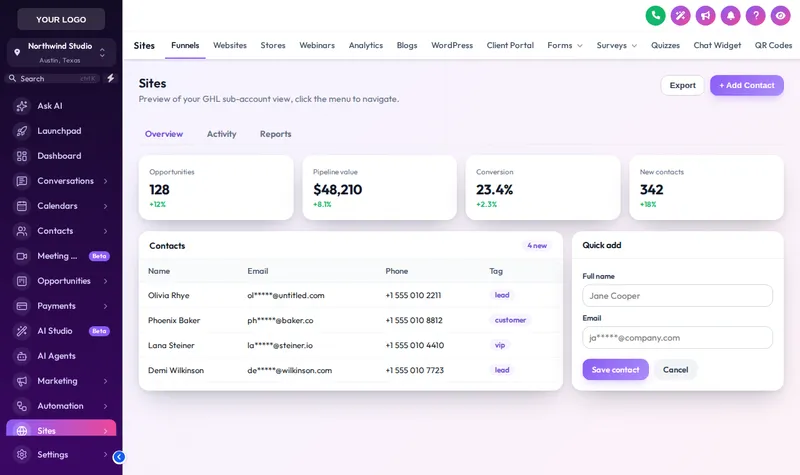
A good warehouse puts the fast movers by the door. The menu builder does the same for GoHighLevel: rename, reorder, hide and group items, then pick a sidebar, a top bar, 8 mega menu styles or a floating quick menu.
Stock
- Every tool shown to every user
- Labels written for marketers
- Long scrolling sidebar on a laptop
Off the shelf
- Only the items a client needs, in their order
- Labels in the client's own words
- Grouped sub-menus and mega panels
Straight answer
Can you customize the GoHighLevel sidebar menu?
Yes. With a GHL customizer account you can rename, reorder, hide and group every GoHighLevel menu item, add your own links, and choose a left sidebar, right sidebar or top bar. Depot Plus adds 8 mega menu styles and a floating quick menu. Agency and sub-account views get separate layouts.
- menu positions
- 3
- mega menu styles
- 8
- top bar styles
- 8
- header styles
- 8
Figures checked against the customizer catalogue on .
Before and after
Thirty items, and the client uses six
Stock GoHighLevel shows every tool to every user. A roofing owner who only needs conversations, calendars and opportunities scrolls past things they will never open, and calls you to ask where the jobs went.
Stock GoHighLevel
- Every tool shown to every user
- Labels written for marketers
- Long scrolling sidebar on a laptop
- One layout for agency and client
With the menus and navigation rack
- Only the items a client needs, in their order
- Labels in the client's own words
- Grouped sub-menus and mega panels
- Separate agency and sub-account layouts
On the depot floor
How agencies on these aisles use it
Written for the trades this depot stocks crates for. Each card links to the aisle it comes from.
- Home and tradeJobs, not opportunitiesRename Opportunities to Jobs and Calendars to Schedule, hide the marketing tools, and a trade owner finds their way without a training call.
- Health and wellnessFront desk firstPut Conversations and Calendars at the top for reception, and keep reporting in a sub-menu for the practice manager.
- Professional servicesMatter and client languageA law firm reads Matters and Clients, not Opportunities and Contacts, and the menu says so.
- AgenciesAgency view stays yoursKeep the full agency menu for your team while every client gets a trimmed sub-account menu.
Rack CZ-07
What the menu builder does
Rename, reorder, hide
Drag items into the order a client works, rename them in their language and hide what they do not use.
Your own links
Add links to a help centre, a booking page or a training video, with icons that match the rest.
Sidebar or top bar
Left, right, or a top bar in 8 styles, with an option to merge the header into it.
8 mega menus
Columns, split, cascade, tiles, tabs, icon rail, accordion and wide band, for accounts with many sections.
Floating quick menu
A bubble, dock or side rail in 8 finishes, with the shortcuts a client uses most, draggable anywhere.
8 header styles
Soft tint, brand, gradient, glass, dark and accent line headers to go with the menu.
Which package
Unlocked from Depot Plus
Menus and navigation need Depot Plus or above. All three are one-time payments with lifetime access.
Three moves
Setting up menus and navigation, start to finish
Log in
Your login is emailed as soon as payment clears, usually within minutes and never more than 24 hours. Depot Lite covers the layout; Depot Plus adds mega menus and the quick menu.
Arrange the menu
Drag, rename, hide and group items for the sub-account view, then for the agency view if you want them different.
Save
If the loader line is already in GoHighLevel, saving is the last step. Menus update on the next page load.
Questions
About menus and navigation
Can I rename and hide GoHighLevel menu items?
Yes. Every item can be renamed, reordered, hidden or moved into a group, and you can add your own links with icons.
Which package includes the menu builder?
The layout choice (sidebar or top bar) is in every package from Depot Lite. Mega menus and the floating quick menu need Depot Plus at $449 one time.
Can the agency view and the sub-account view be different?
Yes. Each has its own menu, so your team keeps full access while clients see only what they use.
Does hiding an item remove a user's permission?
No. Hiding is visual. Permissions are still set in GoHighLevel's own user settings, which is where access should be controlled.
What is a mega menu in GoHighLevel?
A panel that opens from a menu item and shows its sub-pages laid out in columns, tiles, tabs or a rail. There are 8 styles to choose from.
Will a GoHighLevel update break my menu?
The customizer maps items by GoHighLevel's own identifiers, so renamed and reordered items follow along. New items GoHighLevel adds appear in their default place until you move them.
Can I put the menu at the top instead of the side?
Yes. The top bar comes in 8 styles and can merge with the header to save vertical space on laptops.
What is the floating quick menu?
A small launcher with a client's most used shortcuts, as a bubble, dock or side rail, in 8 finishes. Users can drag it where it suits them.
Next racks
Usually picked alongside
- CZ-01Every tierThemes and dark mode
- CZ-08From Depot PlusDashboard designs
- CZ-10From Depot PlusContact actions bar
- All ten racks on the GHL customizer overview
- GHL customizer pricing, line by line
- The two-line install guide
- Snapshot crates for the system underneath
DFY Depot is independent and not affiliated with HighLevel Inc. GoHighLevel and HighLevel are trademarks of their owner. The GHL Customizer is delivered through GoHighLevel's own custom code settings.
Rack CZ-07
Take menus and navigation off the shelf
Menus and navigation come with Depot Plus and above, from $449 paid once. Login emailed within minutes (max 24 hours).
- Login emailed within minutes (max 24 hours)
- One-time payment, lifetime access
- Installed with one line, about 2 minutes