Rack CZ-08 · Dashboard designs
GoHighLevel dashboard design, ready to put on the wall
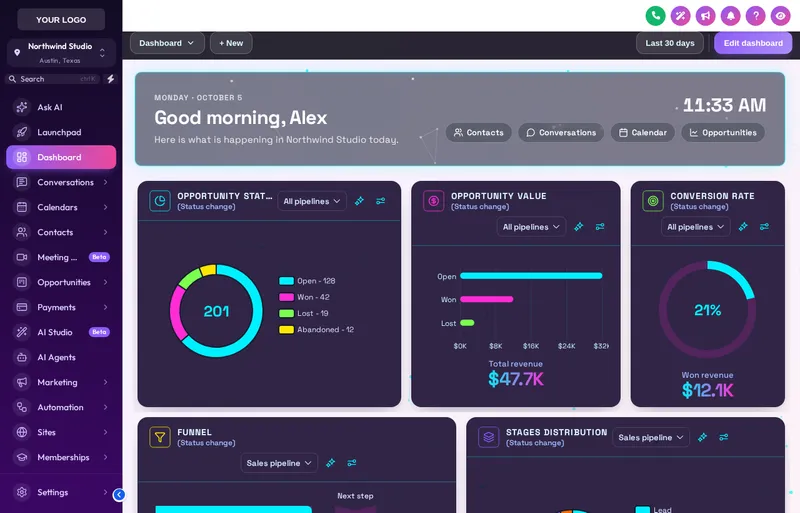
The dashboard is the screen a client opens every morning. 18 designs restyle it with a hero greeting, a live clock, quick links and chart colours that match your brand, in dark, light and photo styles.
- 18
- dashboard designs
- 6
- photo backgrounds
- 12
- dark and light designs
- 0
- extra code to install
Straight answer
How do you change the GoHighLevel dashboard design?
In a GHL customizer account on Depot Plus or above, you open the dashboard designer, pick one of 18 designs, set the greeting, quick links and colours, and save. The design applies to the GoHighLevel dashboard page through the same loader line as your theme, so there is nothing extra to install.
Figures checked against the customizer catalogue on .
Live bay
Switch dashboard designs
Filter by dark, light or photo, then pick a design. The Cyber Grid design is this depot's default. The sidebar chips change the theme around it so you can check the pairing.
Loading the live preview
Cyber Grid Each chip is one of the real dashboard designs, applied by the customizer engine to a copy of the GoHighLevel dashboard. The clock is live; the quick links and chart colours are part of the design.
Rack CZ-08
What a dashboard design sets
Hero and greeting
A greeting by time of day with a live clock, set on glass, gradient, grid or photo backgrounds.
Quick links
Buttons to the pages a client opens most, styled as part of the design rather than added on.
Chart colours
Chart palettes follow the design or your brand colour, so reporting looks like it belongs.
Dark, light and photo
18 designs across three styles, including 6 with photo backgrounds such as city night and golden hour.
Ambient motion
Some designs carry soft particles or light; all of it stops for users who ask for reduced motion.
Works with any theme
Dashboards sit inside whichever theme the account wears, so you can pair a dark dashboard with a light theme.
Before and after
The first screen of the day is the dullest
The stock dashboard is a grid of widgets on a grey page. It works, and nobody looks at it twice. A designed dashboard turns the first screen into the place the client checks the day, with the links they need right there.
Stock GoHighLevel
- A grey page of default widgets
- No greeting, no brand
- Charts in stock colours
- Shortcuts buried in the menu
With the dashboard designs rack
- A designed hero with a greeting and clock
- Your colours on every card
- Charts that follow the brand palette
- Quick links to the jobs of the day
On the depot floor
How agencies on these aisles use it
Written for the trades this depot stocks crates for. Each card links to the aisle it comes from.
- Home and tradeThe morning checkQuick links to today's calendar, new leads and unpaid invoices, on a dark design that reads well on a tablet in the office.
- Health and wellnessA calm photo dashboardA lagoon or golden-hour photo background with the day's appointments one tap away suits clinic front desks.
- Professional servicesSober and clearA slate or obsidian design with clean charts for a firm where partners only open the dashboard to check numbers.
- AgenciesClient reporting that looks finishedBranded chart colours make the reporting you already set up look like part of your product.
Which package
Unlocked from Depot Plus
Dashboard designs need Depot Plus or above. All three are one-time payments with lifetime access.
Three moves
Setting up dashboard designs, start to finish
Log in
Your login is emailed as soon as payment clears, usually within minutes and never more than 24 hours. The dashboard designer is in Depot Plus and Depot Max.
Pick and set
Choose a design, set the greeting, quick links and chart palette, and check it in the preview at desktop and phone size.
Save
It applies through the loader line already in GoHighLevel. The dashboard updates on the next page load.
Questions
About dashboard designs
How many GoHighLevel dashboard designs are there?
18: dark and light designs plus 6 with photo backgrounds.
Which package includes the dashboard designer?
Depot Plus at $449 one time, and Depot Max. It is not in Depot Lite.
Does a dashboard design change my GoHighLevel widgets or data?
No. It restyles the page and adds the hero, clock and quick links. Your widgets, reports and data stay exactly as they are.
Can each sub-account have a different dashboard?
The design is part of the template applied to your accounts. Workspaces let you keep different templates for different groups of clients.
Can I set my own quick links?
Yes. Choose the label, icon and destination for each quick link, so the buttons point at the pages that client uses.
Do the chart colours follow my brand?
They can. Each design has its own palette, or you can switch charts to follow your brand colour.
Is the motion distracting?
It is subtle by design, and it switches off for any user whose device asks for reduced motion.
Do I need extra code for the dashboard?
No. The dashboard design is delivered by the same loader line as your theme.
Next racks
Usually picked alongside
- CZ-01Every tierThemes and dark mode
- CZ-07From Depot PlusMenus and navigation
- CZ-09From Depot PlusOpportunities board designs
- All ten racks on the GHL customizer overview
- GHL customizer pricing, line by line
- The two-line install guide
- Snapshot crates for the system underneath
DFY Depot is independent and not affiliated with HighLevel Inc. GoHighLevel and HighLevel are trademarks of their owner. The GHL Customizer is delivered through GoHighLevel's own custom code settings.
Rack CZ-08
Take dashboard designs off the shelf
Dashboard designs come with Depot Plus and above, from $449 paid once. Login emailed within minutes (max 24 hours).
- Login emailed within minutes (max 24 hours)
- One-time payment, lifetime access
- Installed with one line, about 2 minutes